✅Simple Japa counting with increment, decrement, and
reset
⏱️Track time taken to complete each round
🔁Automatically registers a round after 108 counts
🙋User Dashboard – Track daily personal Japa stats
🌗Dark/Light Mode toggle
📴Offline Mode – Count without internet and sync later
📤Export Japa history to Excel with time and count
🔔Reminder if last 7 days’ data not submitted
📦Fully packaged as a desktop app (.exe / .app)
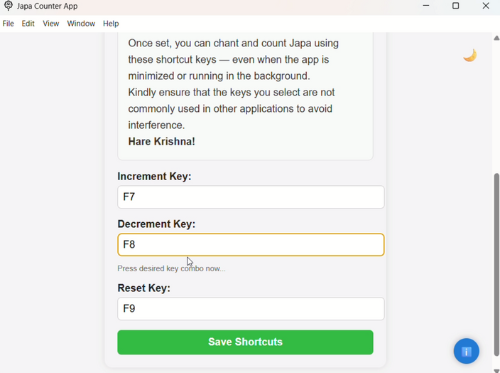
🎯Use shortcut keys even when app is minimized
How to Install & Register
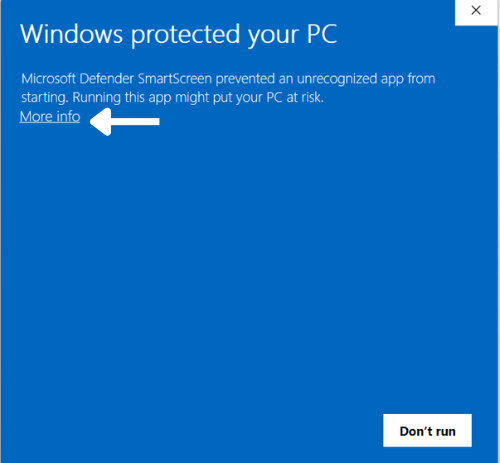
- When you install the app, you might see a blue screen saying "Windows Protected your PC".
- Don’t worry, it is completely safe. Click on "More Info".
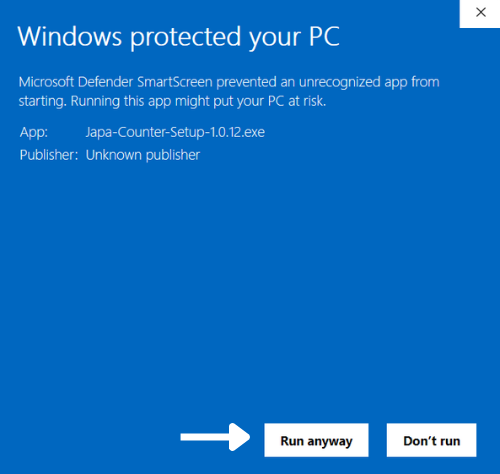
- Then click "Run Anyway" to proceed.
- The app will begin installing automatically.
- Once installed, register using your Name, Email, and Password.
- The registration may take a few moments. You'll then be redirected to the login page.
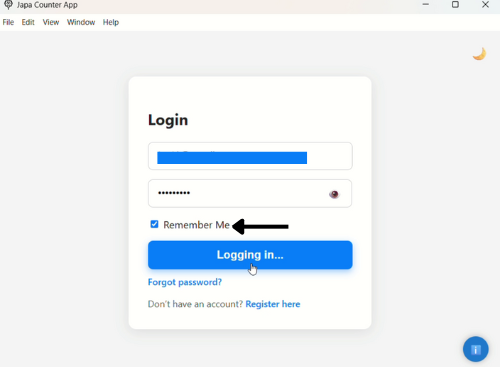
- Log in using your credentials and check "Remember Me" to save login details.
- First login might take a few extra seconds. After that, it will be fast.
🎬 Installation & Registration Demo
×
![]()
👣 Visitor Count